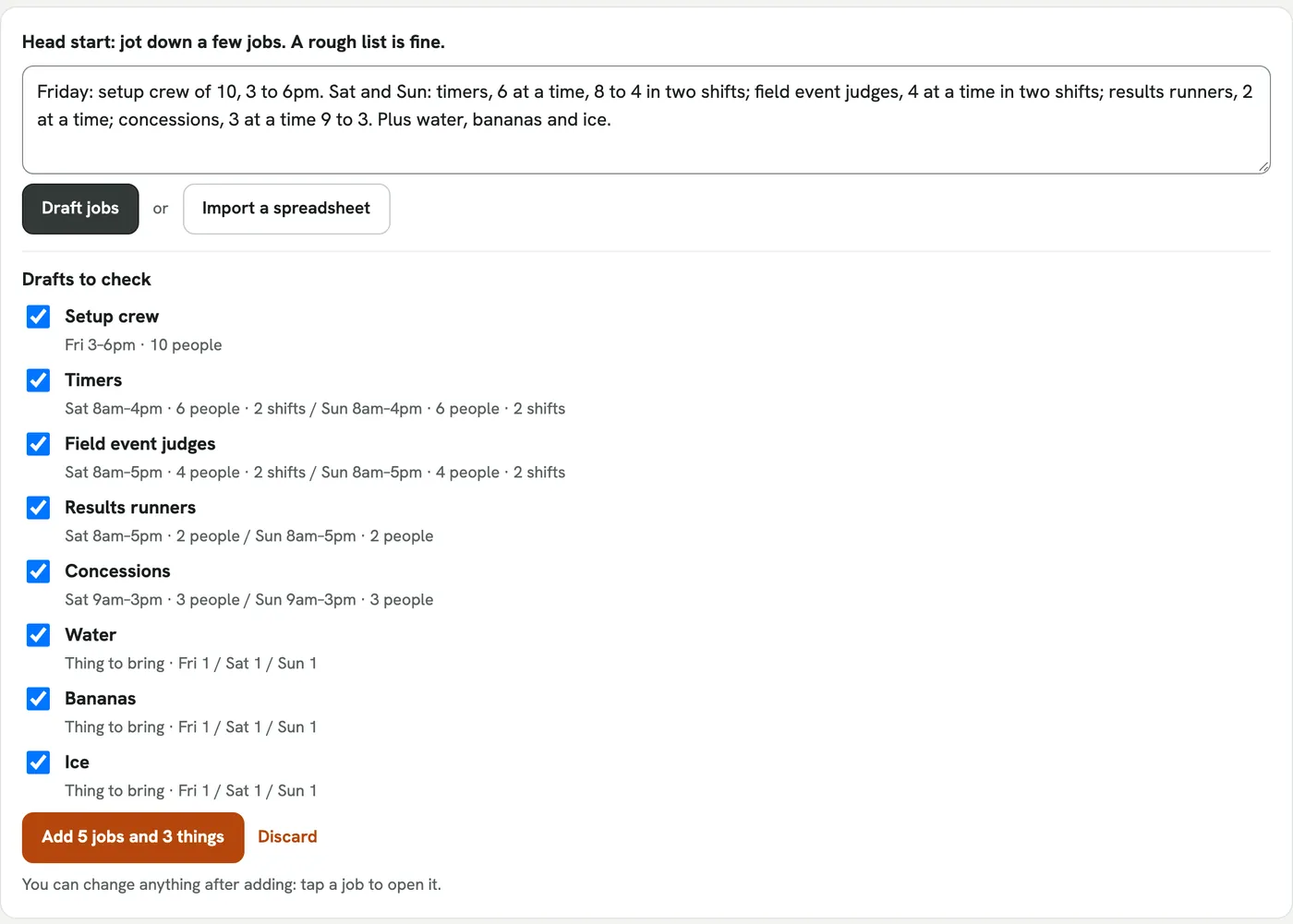
Type the event the way you’d say it.
“Friday: setup crew of 10, 3 to 6pm. Sat and Sun: timers, 6 at a time, 8 to 4 in two shifts…” OrangeSlice turns that into jobs, shifts and things to bring for you to check. Nothing is added until you say so.
Free to start · No credit card · First event live today
Where it helps.
The busywork, not the decisions.
A head start on every event
Jot down what you need, rough is fine. You get drafts to check, untick or change before anything is added.
Your old spreadsheet, imported
Upload last year’s sign-up sheet. It drafts the jobs and things to bring, and puts the people in it on their shifts.
Help filling short shifts
For shifts likely to come up short, it suggests who to ask and why. You approve each ask before it’s sent.
A check for gaps
It reads the schedule for holes, like a job that ends before the event does.
Or run the club from Claude or ChatGPT.
Admins and coordinators can connect the AI tool they already use. It works as you, with your permissions: anything you can do in OrangeSlice, you can ask it to do.
- Before it emails anyone, it shows who gets what and waits for your yes
- Athletes under 18 are always first name and last initial
- Every change is logged under Assistant activity
- Off until an admin turns it on for the club
- “Set up this year’s Spring Invitational like last year’s, Saturday only.”
- “Add a timers job, 8 to 12, six people, split into two shifts.”
- “Here’s our sign-up sheet. Put everyone on the shifts they signed up for.”
- “Which households are short on hours?”
Questions clubs ask
Something else? Ask us. A person answers.
Do I have to use the AI features?
No. Every AI feature can be turned off for your club, and without them OrangeSlice is still a complete sign-up, reminder and hours tool.
Will the AI email volunteers on its own?
No. Suggested asks wait on your dashboard until a coordinator approves them, and a connected AI tool previews every email and waits for your confirmation.
What does the AI see when I import a spreadsheet?
Only the work columns: jobs, days, times and counts. Names and emails in the sheet are read by OrangeSlice’s own code and never sent to the AI.
Which AI tools can I connect?
Claude, ChatGPT, Claude Code and other tools that support remote MCP connectors. You sign in with your OrangeSlice email and approve the connection.
What spreadsheet formats can I import?
An .xlsx or .csv file, up to 500 rows, or rows pasted in. You review every job, item and person before anything is saved.
Your first event can be live today.
Name it, pick the days, add a few jobs and share one link. OrangeSlice handles the reminders, the waitlist and the hours.